Shared memory management
Refreshing the MarketGrid Shared Memory database whilst keeping the Matching Engine online.
Online Refresh
MarketGrid has the ability to refresh shared memory "online", which means that it will do the process described above without the need for the Matching Engine to stop and without disconnecting any users. The refresh process is very quick (typically seconds) and is largely transparent to users (at worst, they will notice a minor "latency spike" of a few seconds).
The online refresh process purges retired records while the Matching Engine (and other processes) remain running and while retaining relevant state for all logged in users. It uses a set of Engine Cache files (or a special block of shared memory) to do this, allowing the current state of the Matching Engine to be restored after cleaning out shared memory.
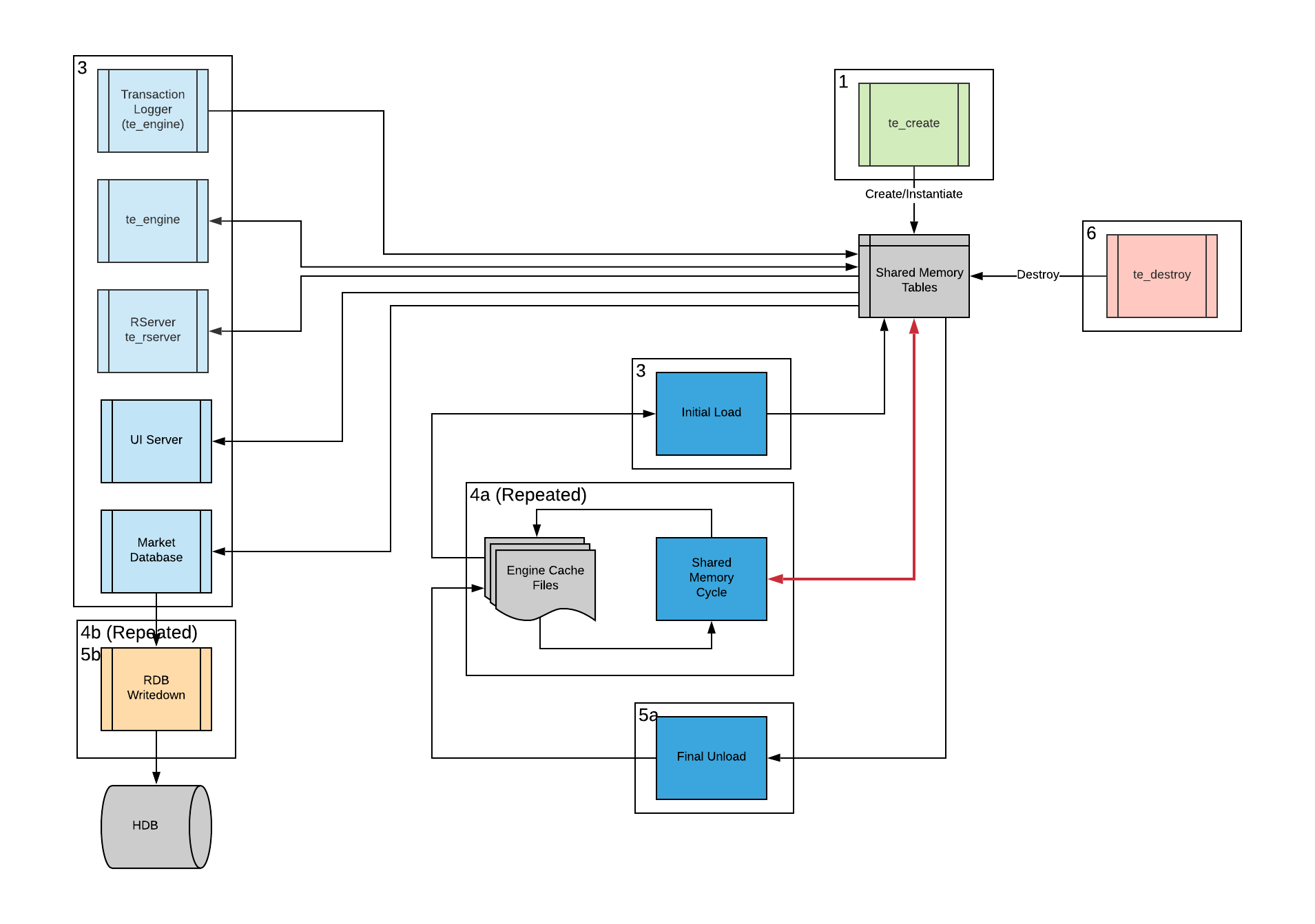
Create the shared memory (and memory mapped files) that MarketGrid will use
Initial load of static data and required transactional data (such as open Orders) from previously saved Engine Cache Files (or tsvs)
MarketGrid matching Engine and other processes run, utilising shared memory
Shared memory Online Cycling
a. Shared memory is cycled while the Matching Engine remains online and users remain connected
b. At each cycle, the Market Database writes down its RDB to the HDB and clears the RDB
System Stop
a. Unload static data and transactional data to Engine Cache files using same mechanism as online cycling
b. Write down Market Database RDB to HDB
Destroy shared memory (and memory mapped files), stop Matching Engine and other processes
Shared Memory Refresh (Garbage Collect)
An online shared memory refresh allows "dead" records that are not required by the Matching Engine to be removed and space recovered in shared memory, effectively allowing the System to operate online indefinitely.
When the System is running and the refresh process runs, the following happens to shared memory tables.
Static Tables
For static tables (such as User, Firm, Instrument, etc), new rows may be added intra-day and will be appended to the table in shared memory. Records may be deleted by removing the Active bit from the Status field, however they are not physically removed from shared memory straight away. A static record that is marked as deleted in shared memory may be undeleted by adding the Active bit again to the Status field. This is illustrated below.
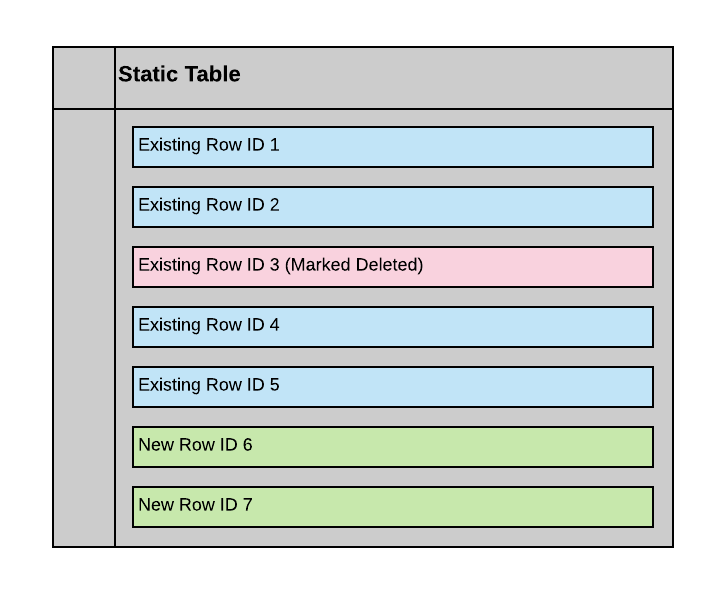
When an online cycle occurs, each static table is written down to its own Engine Cache file. Any rows that are marked as deleted at the time of the cycle are not written to the Engine Cache file and will be removed from shared memory during the cycling.
Each static table is then reloaded from its Engine Cache file (which will not include the previously deleted rows), freeing up space at the end of the table for subsequent new rows. This is illustrated below. 
Transactional Tables
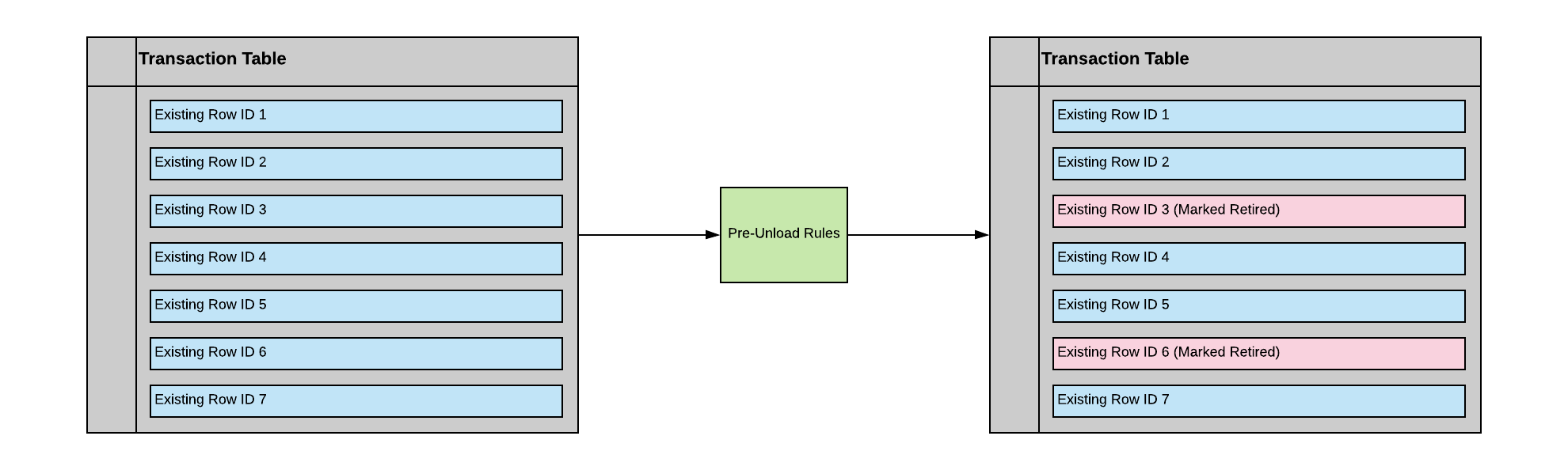
The process for transactional tables (such as Order, Trade, Holding) is similar to that for static tables, however, the process of eliminating rows at the time of writing each table to its Engine Cache file is rule-based rather than dependent on records having been deleted. For each transactional table, there may be one or more rules that determine which rows in the table are written to the Engine Cache file and which are discarded. For example, Trades may be retained for N days, Orders that are still Open will be retained but inactive Orders may be discarded, Holdings with zero balance may be discarded. These are the same rules that determine whether records are reloaded in the old daily cycle regime. Before the tables are written to Engine Cache files, the Matching Engine will apply rules to each transaction table to determine which records should be discarded. This is illustrated below.
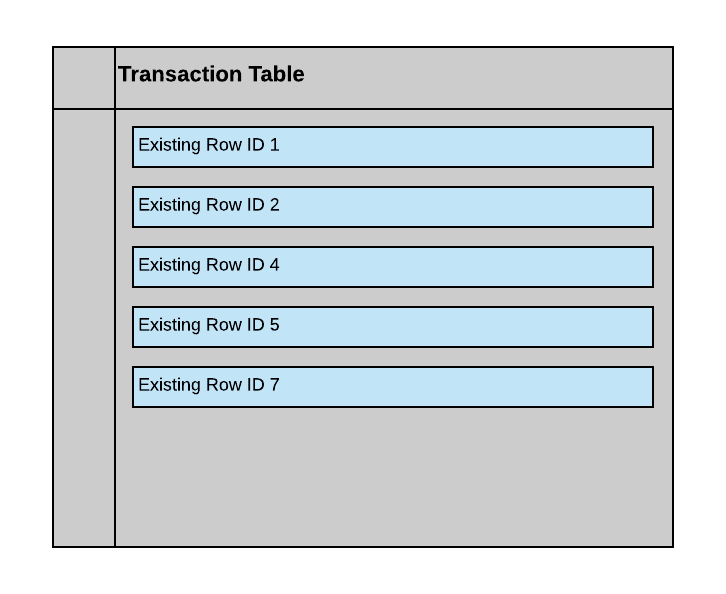
Each transactional table is then reloaded from its Engine Cache file (which will not include the retired rows), freeing up space at the end of the table for subsequent new rows. This is illustrated below.
Change Tables
The process for change tables (such as Order_change, Trade_change, etc) is very simple. Change tables are not written back to Engine Cache files when the System is cycled. Rather, new empty change tables are created. When the refresh process reloads the static and transactional tables from their Engine Cache files, it then runs the normal start up post-processing (that happens when the System is started up from offline) that will populate change tables as required.
Memory Requirements for Online Refresh
The online refresh process requires more shared memory than would normally be used by the System. This is because every shared memory table is replicated (as an empty table but full size) during the refresh process.
How often the shared memory should be refreshed will depend on the total memory available on the server and the maximum amount of shared memory required by the Matching Engine process. A reasonable rule of thumb is that shared memory should be refreshed at least as often as the time required to fully utilise shared memory tables sized to one-third of the total available memory on the server. The ideal refresh period is once per day at midnight which is the best scenario for the write-down of the Market Database HDB date partitions.
During the refresh process, once shared memory tables have been written out to Engine Cache files, the following occurs.
- The System will create a new set of shared memory tables that are the same size as the current shared memory tables
- The Matching Engine will detach from the old shared memory tables and attach to the new set of shared memory tables
- The memory mapped files associated with the old shared memory will be unlinked (deleted) and a new set associated with the new shared memory will be created
- The new set of shared memory tables will be reloaded from Engine Cache files
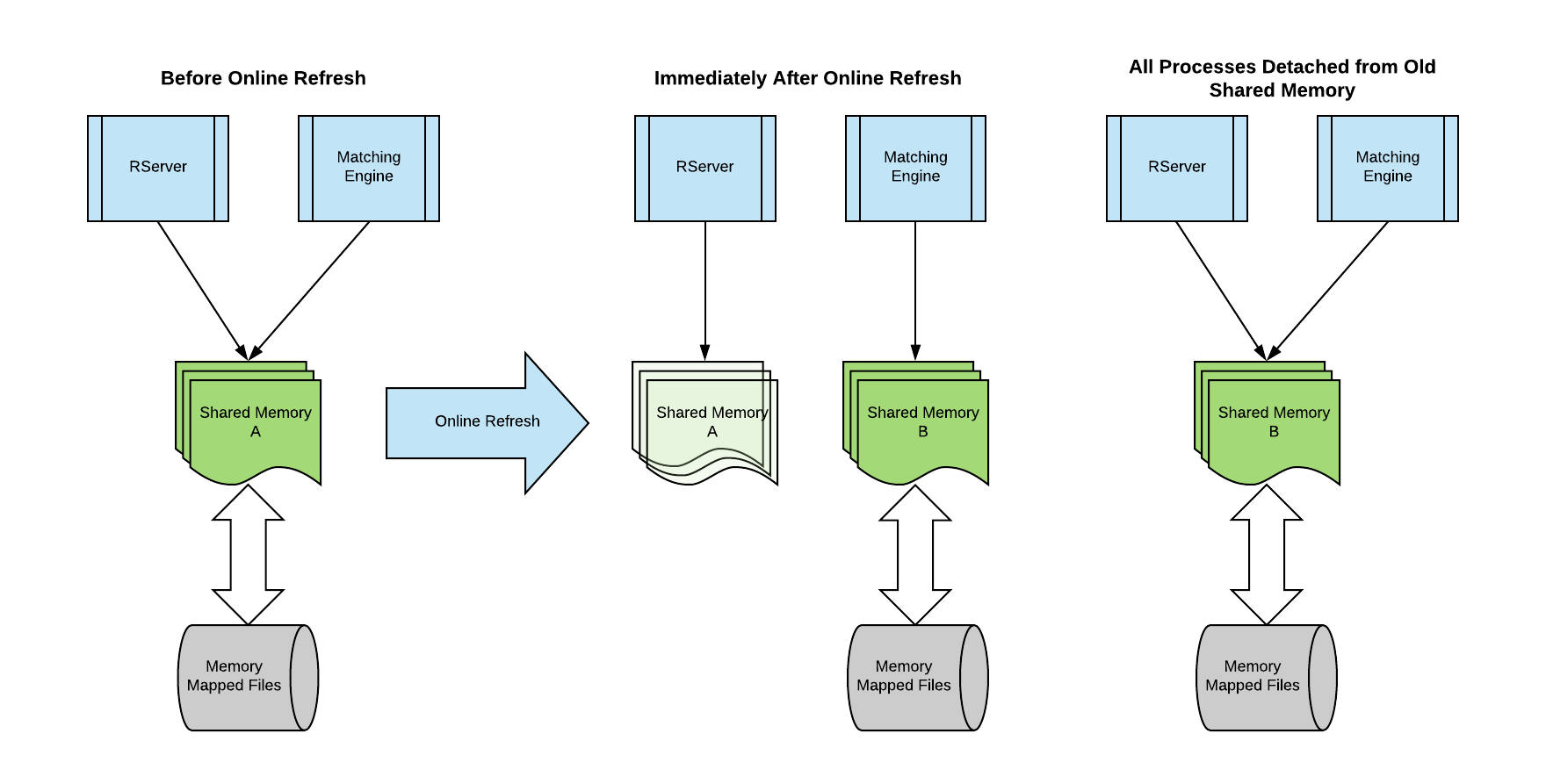
- If processes, other than the Matching Engine are attached to shared memory at the time of the refresh, both the old and the new versions of the shared memory tables will exist while any process remains attached to the old shared memory
- Once all attached processes have detached from old shared memory (and reattached to new shared memory), the operating system will remove the old shared memory tables
NOTE: The refresh process results in double the shared memory usage of that required by the Matching Engine, due to the need to create new shared memory before the old shared memory is destroyed. The frequency with which the refresh process may need to be run will be therefore determined in part by the amount of physical memory available on the server.
This is illustrated below, where there is an RServer, in addition to the Matching Engine that is using shared memory.
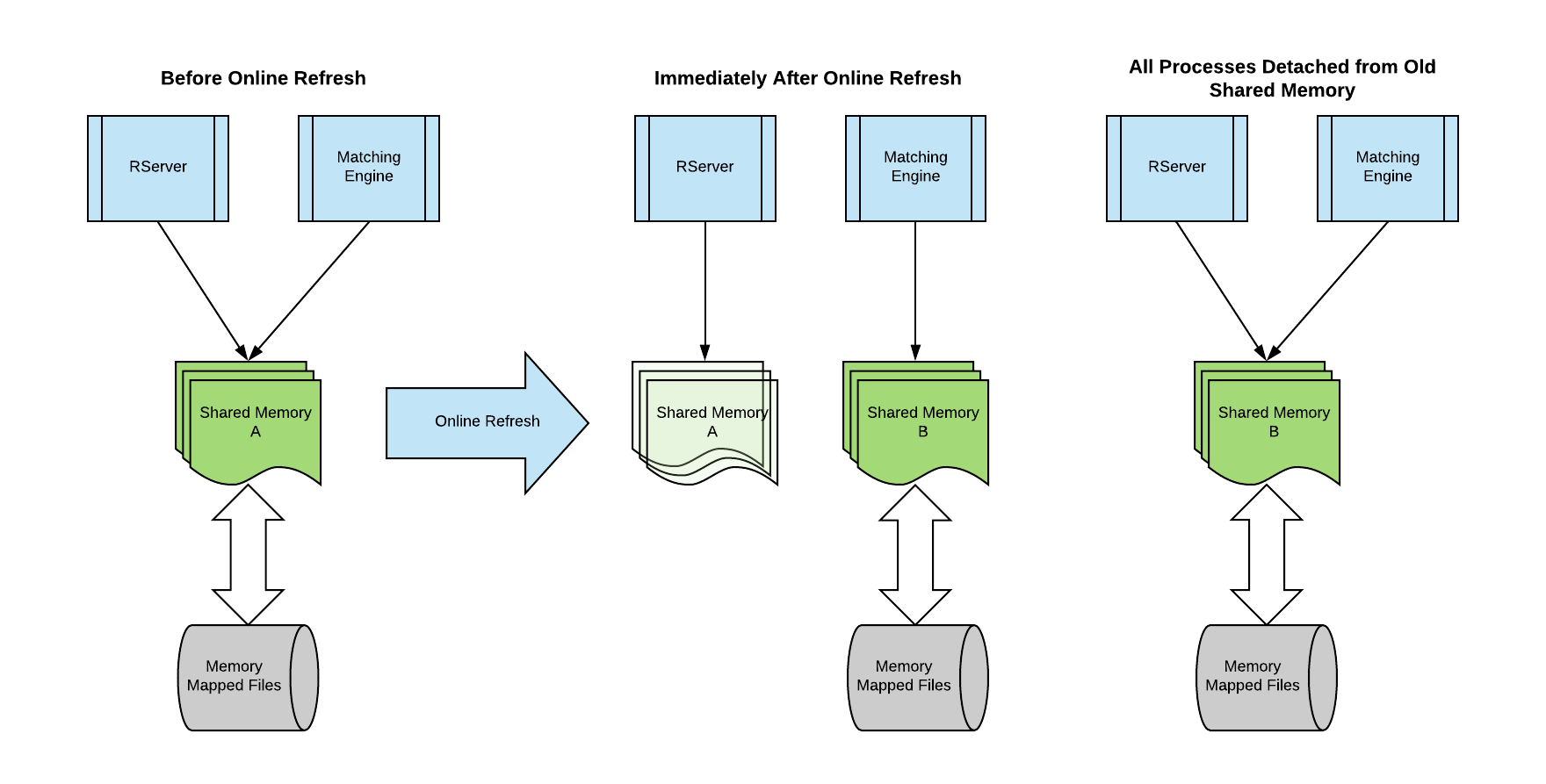
In the process illustrated above, while the RServer remains attached to old shared memory, its view of each table will be exactly as it was at the time of the online refresh. The Matching Engine, after reloading the new shared memory tables from Engine Cache files will continue processing transactions using the new shared memory tables. The RServer (or any other process attached to old shared memory) will not see any new data until it reattaches to new shared memory.
In addition to the (temporarily) replicated shared memory tables, it is possible to utilise additional shared memory for Engine Cache files in place of files on disk. This is covered in the section Shared memory management#Using Memory for Engine Cache Files.
NOTE: When the refresh process has run, the old shared memory will not be released by the operating system until ALL processes that are attached to it detach (and possibly attach to the new shared memory). It is important that once a refresh process runs, all attached processes detach from old shared memory. This applies to MarketGrid tools such as
te_dumpthat are easily left running and attached so care must be taken when using such tools or the System could eventually run out of free memory.
Engine Cache Files
Engine Cache files are an integral part of the refresh process. Each Engine Cache file contains the set of records, for one shared memory table, that is to be reloaded during the refresh process.
Each Engine Cache file is actually a MarketGrid Transaction Log that contains
- One transaction to set the name of the table for the file;
- Followed by a number of static update transactions, each to load a record of the table; and
- A final record to set the maximum
Idnumber for the table.
The illustration below shows the records for a small Engine Cache file (in this case for the Calendar table). It has one SET_TRANSLOG_LOAD_TABLE record, two STATIC_UPDATE records (for the two records to be loaded from the file) and an ID_MAX record that sets the current highest Id number for the table (new records will be allocated Id numbers after that).
Refresh Phases and Engine Cache Files Location
When shared memory is refreshed online, the location for the Engine Cache files that will be used to unload and reload shared memory is specified. It may be any directory available to the Matching Engine process (that process does the refresh). Each shared memory table will actually produce two Engine Cache files, one with the same name as the table and one with that name and a .idx suffix. For example, the files for the Order table will be Order and Order.idx.
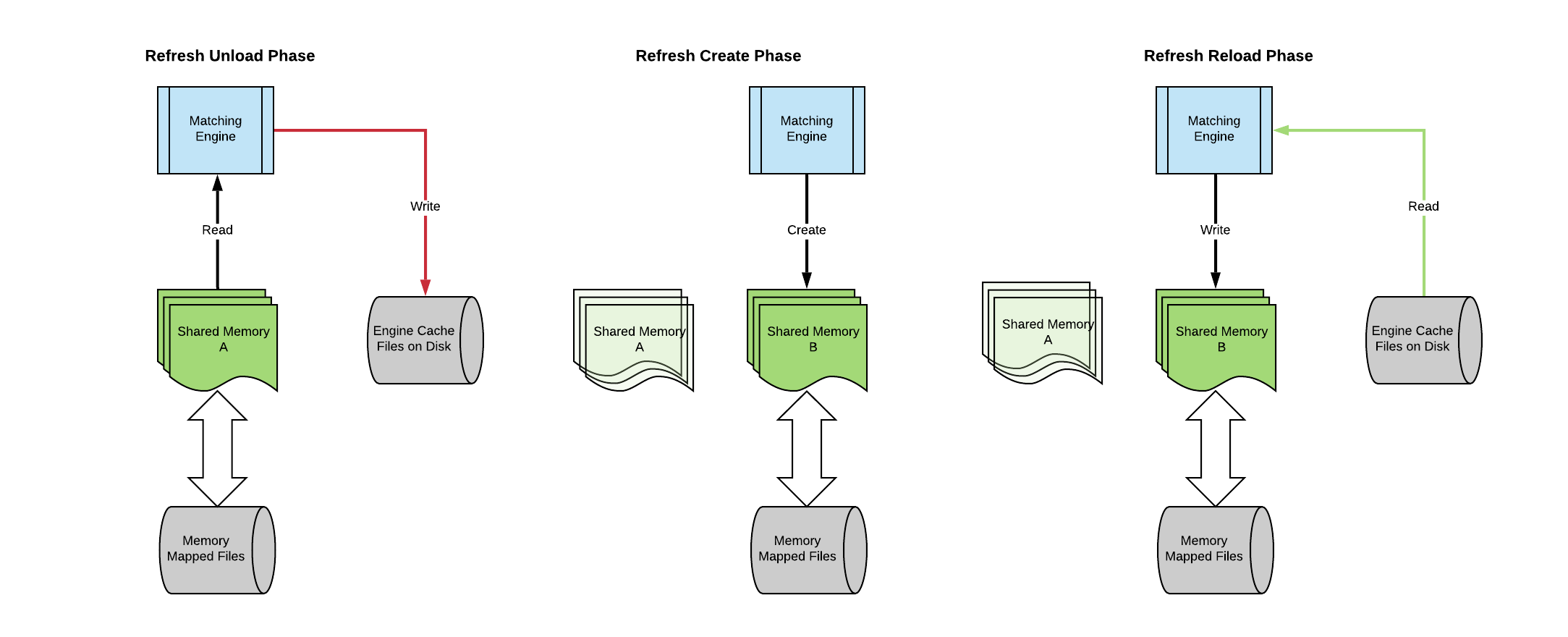
The refresh has three distinct phases:
- Unload each table in shared memory into an Engine Cache file
- Create a new set of empty (zeroed) shared memory tables with the same maximum sizes as the existing shared memory tables
- Reload the new shared memory tables from Engine Cache files
This is illustrated below.
Using Memory for Engine Cache Files
There is an additional option, which is to specify that the Engine Cache files are written directly into a special shared memory table, called the TableCache table rather than to a directory on disk. This is a single block of shared memory, large enough to contain the equivalent of all the Engine Cache files that would be written to disk. It contains a serialised list of the transactions from each of the Engine Cache files that would be loaded individually. The refresh process using the TableCache shared memory table is illustrated below.
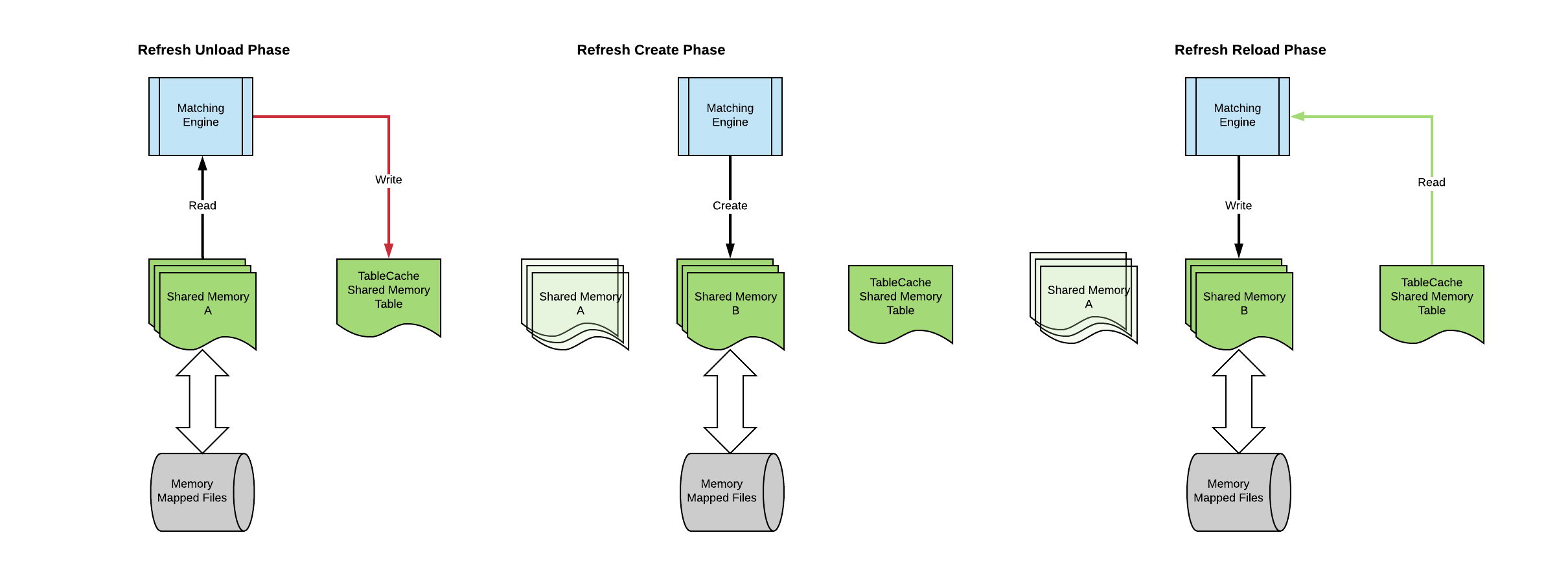
The advantage of using the TableCache table to store the Engine Cache files, rather than disk is that it is very fast and will result in the best performance and lowest perceived latency spike for users when the refresh occurs.
The disadvantage of using the TableCache table are:
- The Engine Cache files are not persisted so cannot be used to restart the system if it is shut down
- There must be sufficient shared memory for the TableCache table to hold all records for all Engine Cache files that would otherwise be written to disk
Memory Requirement for TableCache Table
In order to user the TableCache table, there must be sufficient spare shared memory for for the TableCache table to hold all records for all Engine Cache files that would otherwise be written to disk. The exact size required is difficult to estimate since it depends on the total number of records that will be written out for each static table and each transaction table. In particular, the number of records to be written for transaction tables is quite variable, for example the number of Order records depends on the number of open Orders to be reloaded at the time of the refresh.
The TableCache table is effectively a single large block of memory. However, consistent with other MarketGrid tables, it has a record structure, where each record is a single 1024 byte block of memory. It may be sized in the normal way as for other tables (using the max-recs parameter in the scenario yaml file), so a TableCache table size of 1,000,000 records is a 1GB table.
During the shared memory refresh process, if the TableCache table is being used and it is too small, the System will try to increase its maximum size (in the same way that other shared memory tables can be resized). If the resize fails, the refresh will not proceed and the System will shut down.
Transaction Log Cycling
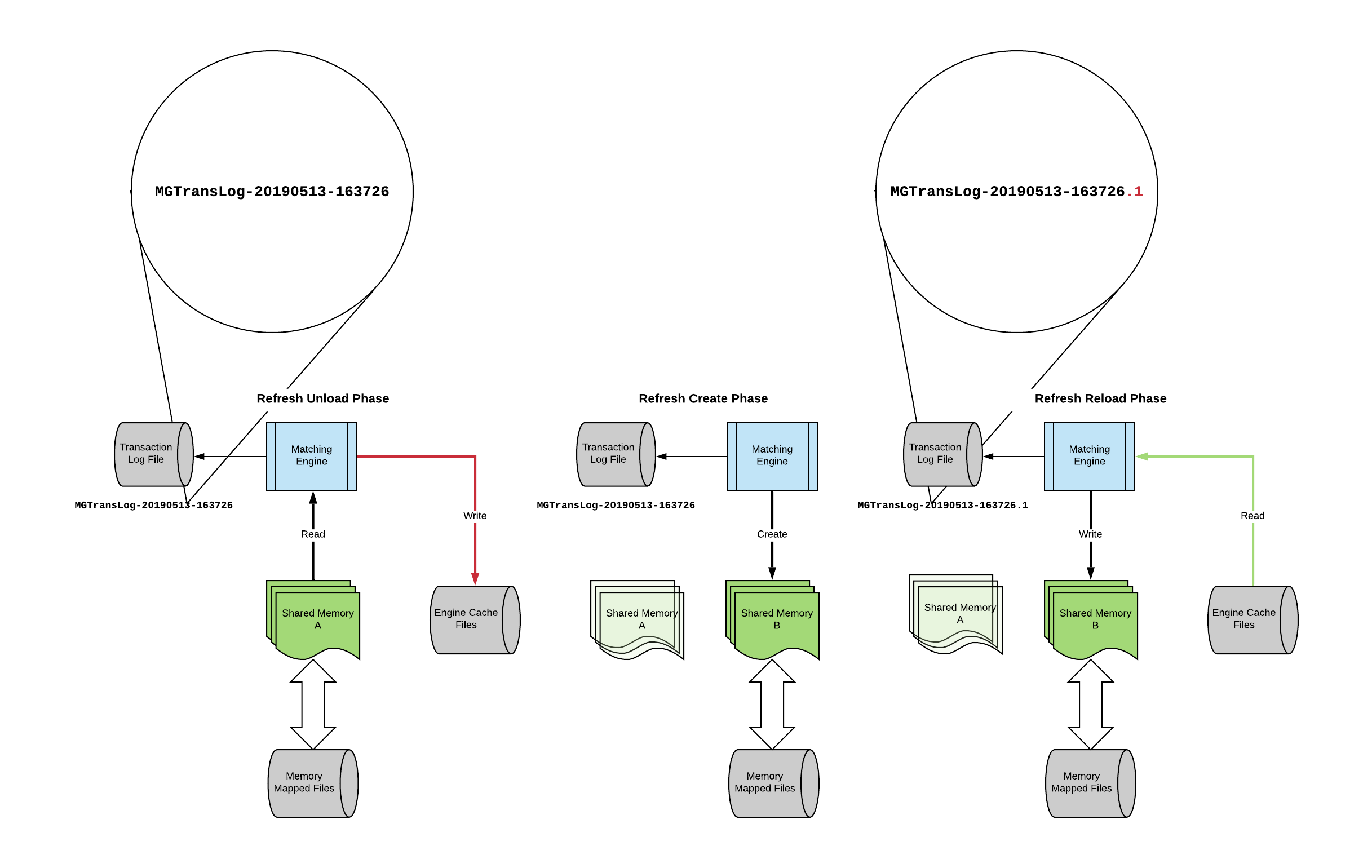
As part of the shared memory refresh process, the transaction log file for the Matching Engine will be recycled whenever the shared memory process is run. With each such recycle, a .N suffix will be added to the name of the original transaction log file to create the new transaction log file name, where N increases monotonically from 1. This is illustrated below for a first shared memory refresh for a System that was started using transaction log file name MGTransLog-20190513-163726, where a new transaction log file, MGTransLog-20190513-163726.1 is created by the refresh process. The next refresh process would create MGTransLog-20190513-163726.2 and so forth.
Recovery and Restarting from Transaction Logs
A shared memory refresh can be thought of as a checkpoint. The System may be restarted from any of the transaction log files - the original file or the subsequent recycles (suffixed with .N). For any given transaction log, the restart from that log will return the System to the state that it was in just before the next refresh.
For example, suppose that the System was started up on 13th May at midnight and then run over four days, with a refresh every midnight, resulting in a series of transaction log files as shown in the table below.
| Date | Transaction Log | |||
|---|---|---|---|---|
| 20190513 | MGTransLog-20190513-000001 | |||
| 20190514 | MGTransLog-20190513-000001.1 | |||
| 20190515 | MGTransLog-20190513-000001.2 | |||
| 20190516 | MGTransLog-20190513-000001.3 |
If the transaction log MGTransLog-20190513-000001.2 was used to restart a Matching Engine, it would replay all the transactions from the log and put the System into the state that it was just before the shared memory refresh for 16th May.
In particular, this means that for recovery purposes, only the last transaction log file needs to be replayed, no matter how long the System has been online and how many shared memory refreshes have been done.
Initiating a Shared Memory Refresh
A shared memory refresh is initiated in the System through an external transaction. When the Matching Engine receives a CycleSystem transaction from an appropriately authorised user, it will initiate the shared memory refresh process.
The CycleSystem transaction must be received from a user that has Amend permission on the System Venue in the Venue table (that is the definition of a Super User). Otherwise it will be rejected.
The CycleSystem message has a number of parameters as follows.
| Parameter | Description |
|---|---|
WriteCache | This may be the value 1 or 0. If set to 0, no Engine Cache will be written from existing shared memory, but the shared memory will be refreshed and reloaded from an existing set of Engine Cache files that must be disk-based and specified with the FilePath parameter. If set to 1, Engine Cache files (or memory) will be written and shared memory will be refreshed and reloaded from that new Engine Cache. |
FilePath | Specifies where the Engine Cache should be written. If FilePath is memory, the Engine Cache will be written to the TableCache table in shared memory. If FilePath is any other string, it is taken as a directory specification where the Engine Cache files should be written (it is not important whether there is a trailing / character). Once shared memory is refreshed, it will be reloaded from the Engine Cache specified by FilePath. |
NoConsole | Prevents the refresh process from printing messages to the console. The refresh process generates a number of messages that are written to syslog. If NoConsole is 0, all messages are echoed on the console from where the Matching Engine was started. If NoConsole is 1, messages pertaining to the writing to and reading from Engine Cache for each table are not echoed to the console (other messages that are much less voluminous are still written to the console). |
The following table describes the steps that happen when the refresh process is initiated. The steps in the shaded rows will be skipped if WriteCache is set to 0.
| Step | Action | Description |
|---|---|---|
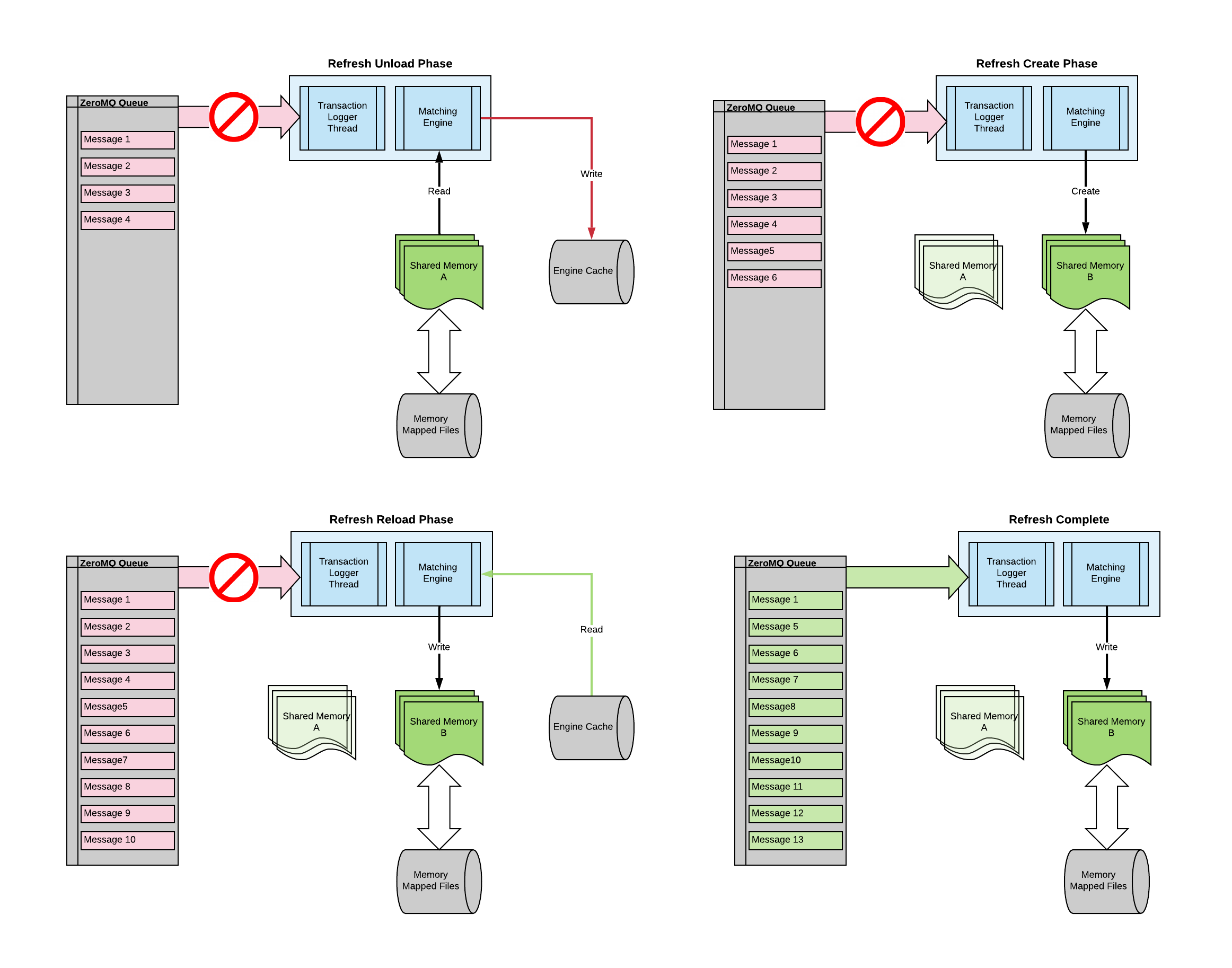
| 1 | Stop Processing Incoming Message Queue | The Matching Engine's Transaction Logger thread stops processing any incoming external messages. Messages will continue to be received by the ZeroMQ queue but will not be removed from that queue by the Transaction Logger while the refresh process is taking place. |
| 2 | Place the System into UNLOAD Mode | The Matching Engine sends itself an internal transaction to change the System Mode. |
| 3 | Do Unload Pre-Processing | When the Matching Engine is placed into UNLOAD Mode, it automatically executes any unload pre-processing, for example to retire transactions that are not required to be reloaded. In UNLOAD Mode (and CLOSED Mode which the Matching Engine transitions to in step 5), the Matching Engine will not process most transactions. |
| 4 | Unload Shared Memory | Shared memory is unloaded into Engine Cache files. The location for the Engine Cache files is specified in the FilePath parameter of the CycleSystem message. If FilePath is "memory", the TableCache table is used instead of disk files, otherwise it is a proper directory specification where the Engine Cache files will be created. |
| 5 | Place the System into CLOSED Mode. | The Matching Engine sends itself an internal transaction to change the System Mode. |
| 6 | Rotate Transaction Log | A new transaction log is created using a .N suffix on the original transaction log name as described in the section Shared memory management#Transaction Log Cycling. |
| 7 | Create new shared memory tables | The Matching Engine detaches from the old shared memory tables and unlinks the associated memory mapped files and create a new set of shared memory tables. |
| 8 | Reload from Engine Cache | The Matching Engine reloads the new shared memory from the transactions in the Engine Cache which may be in the TableCache table (in memory) or in individual files (for each table) on disk. The transactions that are read from the Engine Cache to reload shared memory are automatically written to the rotated transaction log file for restartability from that point. |
| 9 | Signal Reload End | The Matching Engine signals itself with an internal Bootstrap transaction that causes it to execute table load post-processing (as it would do with a cold-start from a Static Database). After post-processing, the Matching Engine changes its System Mode to READY which allows it to process transactions normally. |
| 10 | Resume Processing Incoming Message Queue | The Matching Engine's Transaction Logger thread starts processing messages from the ZeroMQ queue for external transactions. This is triggered by detection of the Matching Engine's internal Bootstrap message. |
The diagram below illustrates how the Transaction Logger thread stops removing incoming messages from its ZeroMQ queue while the refresh process is in progress.
During that time, messages will be received by ZeroMQ and added to the queue but not read from the queue by the Transaction Logger thread and therefore not processed by the Matching Engine.
When the refresh process is complete, the Transaction Logger will begin reading from its ZeroMQ queue again and passing messages to the Matching Engine for processing.
Shutdown Procedures
If the Matching Engine recieves an interrupt signal and the writecacheonsigterm option is enabled, cache files will be automatically written before terminating the engine process.
If the autoload option is enabled, the engine will search for suitable data to start from:
- Suitable cache files
- TransactionLog to replay
- Text files (tsv)
System Table
The System table is handled differently to all other tables during a shared memory refresh.
The System table is a key mechanism by which the Matching Engine process can communicate with processes that attach to shared memory (the other mechanism being via ZeroMQ queues). Elements in the System table are used to communicate refresh status to shared-memory attached processes so the System table cannot be (and is not) destroyed and recreated during the refresh.
Elements in the System table relevant to the refresh process are as follows.
| Table Element | Description |
|---|---|
SystemUUID | This is a unique number for each run of the Matching Engine. If a shared memory refresh occurs, SystemUUID will change to a new value. The change occurs just after the new shared memory tables have been created but before they are reloaded from Engine Cache. |
SystemClientUUID | This number is the same as SystemUUID. However, if a shared memory refresh occurs, SystemClientUUID only changes (to the same value as SystemUUID) when the new shared memory tables have been reloaded from Engine Cache. |
RunId | RunId is a unique number for each run of the Matching Engine. It is sent with every message from an RServer. If a shared memory refresh occurs, the RunId is changed when the new shared memory tables have been reloaded from Engine Cache. |
RemapCount | RemapCount is a monotonically increasing variable that increases whenever a shared memory table is resized. If a shared memory refresh occurs, RemapCount is incremented when the new shared memory tables have been reloaded from Engine Cache. |
SystemCycleCount | SystemCycleCount is a counter of how many shared memory refreshes have been done since the System was stared. It is incremented when the new shared memory tables have been reloaded from Engine Cache. |
SystemCycleState | SystemCycleState indicates the current state of the shared memory refresh process (if any). 0 Means that currently there is no refresh process in progress, the Matching Engine is running normally. 1 Means that a refresh process has been initiated and Engine Cache files are currently being written from shared memory. 1 Means that a refresh process has bee initiated and Engine Cache files are currently being reloaded into shared memory. |
SystemStartTimestamp | This is the time that the System was started (from offline). It does not change, even when a shared memory refresh occurs. |
TServer Handling (API Users)
When a shared memory refresh is initiated, clients that are connect to the System through a TServer process will remain connected.
Transactions sent by a client while the refresh process is in progress will be queued by the Transaction Logger thread of the Matching Engine until the refresh process is complete.
On the completion of the refresh process, connected clients will have their timeout time reset in order that they do not get timed out even if the refresh process takes some time.
RServer Handling (API Users)
When a shared memory refresh is initiated, any RServer processes that are attached to shared memory will remain attached and retain their current view of each table (the values of the data will not change). An RServer can remain attached and continue processing with its current view of shared memory indefinitely.
Once cycling has finished, an RServer will detect that shared memory has been cycled through the TE_System_DATA→SystemCycleCount value. Each time that the Matching Engine completes a re-cycle, it will increment TE_System_DATA->SystemCycleCount. When an external process, such as an RServer, that is attached to shared memory, detects that TE_System_DATA→SystemCycleCount has changed, it is guaranteed that it is safe to detach and re-attach to shared memory to get the post-cycle view.
When an RServer detects that the Matching Engine has re-cycled, it will do the following.
| Step | Action | Description |
|---|---|---|
| 1 | Stop Processing Incoming Message Queue | The RServer will stop processing any incoming external messages. Messages will continue to be receive by the RServer's ZeroMQ queue but will not be removed for processing. |
| 2 | Continue Processing Active Requests | If there are any current active requests being processed by the RServer, it will continue to serve those requests from its view of the old shared memory tables. Since the RServer's view of shared memory will not change once the Matching Engine has refreshed (since the Matching Engine will be processing using the new shared memory tables), every active request on the RServer is guaranteed to finish since eventually every request will have received all available data from the old shared memory tables. |
| 3 | Detach and Reattach Shared Memory | When all active requests are complete, the RServer will detach from the old shared memory and reattach to the new shared memory. |
| 4 | Reset Active Requests | Active requests will be reset to begin receiving data from the first appropriate record(s) in the new shared memory tables. |
| 5 | Send Service Message to Active Requests | All current active requests on the RServer will receive a Service message which indicates that the Matching Engine has refreshed shared memory and any following messages for the request are post the refresh process. The Service message has a single KVP with Key 0 and Value equal to the new RunId of the Matching Engine post the refresh (see section Shared memory management#System Table). The output from te_rqclient for the Service message looks something like below: SERVICE: Seq [ 0] Prev [ 0] IN [ 0] RN [1562840003] BC [ 0] ML [ 0] Id [ 0] 0:Table [1562840003] Note the RunId of the Service message (captioned RN) and the single KVP Value (which is captioned Table) are both the new RunId value in the Matching Engine, which is 1562840003 in this case. |
| 6 | Resume Processing Incoming Message Queue | The RServer starts processing message from the ZeroMQ queue for external messages. |
| 7 | Continue Processing Active Requests | Active requests will continue to be sent new messages from the new shared memory tables. All messages sent after the refresh process will have the new RunId value from the Matching Engine that was received in the Service message just prior to messages from the new shared memory (see section Shared memory management#System Table). |
Dictionary
The Dictionary for KVP pairs cannot change as the result of a shared memory refresh. Once the Dictionary has been downloaded, it does not need to be downloaded again even through multiple shared memory refresh cycles.
Static Tables
For an RServer client that has downloaded static tables, provided that the client has taken StaticNew and StaticChange messages to keep the statics up to date, there can be no new static rows as the result of a shared memory refresh. It is possible that static rows may be removed by a refresh, however, such rows will have been marked deleted and the client will already have that information from StaticChange messages. Therefore, it is safe not to re-download statics after a shared memory refresh. The only side-effect is that the client may have rows that are now physically deleted in the Matching Engine.
Avoiding Messages for Reloaded Orders and Trades
When a memory refresh happens, Orders and Trades that are no longer required will be retired and not reloaded at the end of the refresh process. Some Orders and Trades will be reloaded, for example open Orders (Orders that have not fully matched or otherwise been cancelled) and Trades that are for open Orders. A standard request for Orders and/or Trades (or a Broadcast request that includes Orders and Trades) will result in reloaded orders being sent after the refresh process with Reason set to LOADED.
It is possible to request that LOADED Order and Trade records not be sent. For any request to the RServer for which Order or Trade data will be sent, if the second bit (zero-origin bit one) of the Infinite field in the request is set to 1, only records for Orders that trade will be sent in response to the request and on a shared memory refresh, records for the reloaded Orders and Trades will not be sent (subsequent changes to those Orders will result in messages being sent). This can be used for an individual Orders and/or Trades request or a Broadcast request.
UI Handling
When a shared memory refresh is initiated, clients that are connect to the System through an UI Server (i.e., using the UI HTML5 front-end) will remain connected.
Transactions sent by a client while the refresh process is in progress will be queued by the Transaction Logger thread of the Matching Engine until the refresh process is complete.
On completion of the refresh process, each UI-connected client's view of data will change according to the data that is reloaded into shared memory in the refresh process.
Market Database Handling
The Market Database RDB is updated through a process connected directly to shared memory. On detection of a shared memory refresh it will do the following.
| Step | Action | Description |
|---|---|---|
| 1 | Continue Updating | The RDB will continue to be updated from the old shared memory tables until all records are in the RDB. |
| 2 | HDB Write Down | The RDB will write down to one or more HDB date partitions. The HDB write down also clears the RDB. |
| 3 | Detach and Reattach Shared Memory | The RDB will detach from the old shared memory and reattach to the new shared memory. |
| 4 | Start Updating | The RDB will commence updating from the new shared memory tables. |
Shared Memory Refresh Timing and the Market Database
Since the Market Database writes down its RDB to HDB date partitions whenever a shared memory refresh is detected, ideal timing for the refresh process is once per day at midnight. If this regime is suitable (from the point of view of memory usage and urgency of refresh cycles), it will result in the most efficient write downs and organisation of the HDB.